Akemi

两周复习EFK第三天之索引CRUD与生命周期管理

2026/03/24

有没有发现今天的内容甚至有些倒退,是的,是因为gemini忘了一开始指定的计划了,我让它回想起来之后,它觉得我学的太快了,所以重新学一些基础的东西

查看集群状态_cluster/health

  • number_of_nodes:集群中在线的总节点数。
  • number_of_data_nodes:专门负责存储数据的节点数。
  • active_primary_shards:集群中所有索引处于激活状态的主分片总数。
  • active_shards:所有激活的分片总数(主分片 + 副本分片)。
  • relocating_shards:正在从一个节点移动到另一个节点的分片数(通常发生在扩容或缩容时)。
  • initializing_shards:正在初始化的分片数(刚创建索引或节点重启时)。
  • unassigned_shards重点关注。未分配的分片数。如果非 0,集群状态通常会变黄或变红。
1
2
3
4
5
6
7
8
9
10
11
12
13
14
15
16
17
18
{
"cluster_name": "es-cluster",
"status": "green",
"timed_out": false,
"number_of_nodes": 3,
"number_of_data_nodes": 3,
"active_primary_shards": 49,
"active_shards": 98,
"relocating_shards": 0,
"initializing_shards": 0,
"unassigned_shards": 0,
"unassigned_primary_shards": 0,
"delayed_unassigned_shards": 0,
"number_of_pending_tasks": 0,
"number_of_in_flight_fetch": 0,
"task_max_waiting_in_queue_millis": 0,
"active_shards_percent_as_number": 100.0
}

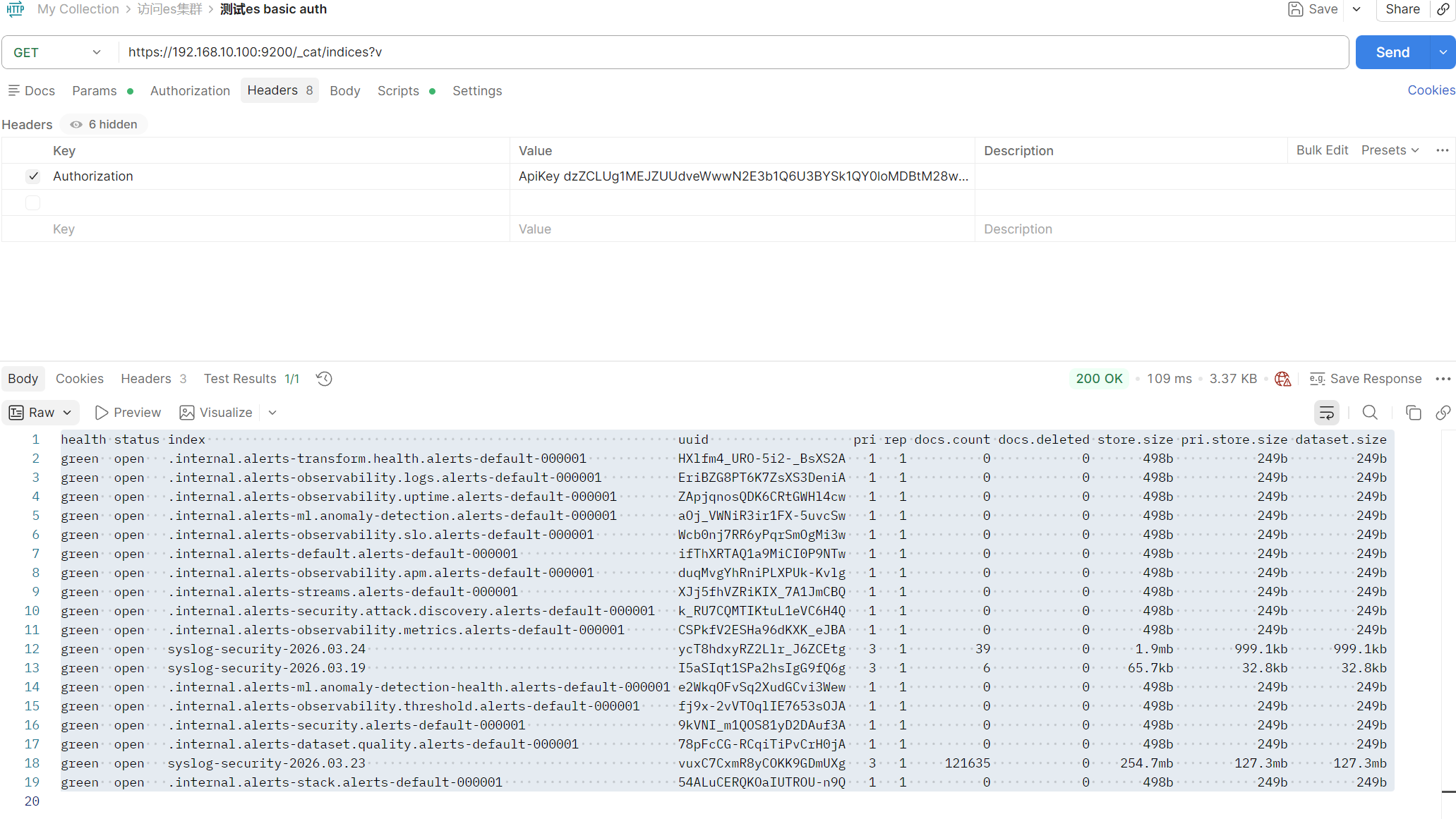
查看索引清单_cat/indices

  • health:这个索引自己的健康度。
  • status:通常是 open
  • index:索引的名字(比如 syslog-security-xxx)。
  • docs.count:这里面现在存了多少条日志?
  • pri (Primary):主分片数量。
  • rep (Replica):副本分片数量。

可以看出的内容

  • .internal 开头的:这些是系统的”内账”,记录的是 Kibana 的配置、告警规则等
  • syslog-security 索引,pri 是 3,rep 是 1。数据被切成了 3 块(分片)存储,且每一块都有 1 个备份
ES的CRUD

1
2
3
4
5
6
7
8
9
10
11
12
13
14
15
16
17
18
19
20
21
22
23
24
25
26
27
28
29
30
31
32
33
34
35
36
37
38
39
40
41
42
43
44
45
46
47
48
49
50
51
52
53
54
55
56
57
58
59
60
1.创建一条假日志
PUT /test-index/_doc/1
{
"user": "admin",
"action": "login",
"status": "success",
"timestamp": "2026-03-24T10:00:00Z"
}
返回
{
"_index": "test-index",
"_id": "1",
"_version": 1,
"result": "created",
"_shards": {
"total": 2,
"successful": 2,
"failed": 0
},
"_seq_no": 0,
"_primary_term": 1
}

2.查询假日志
GET /test-index/_doc/1
返回
{
"_index": "test-index",
"_id": "1",
"_version": 1,
"_seq_no": 0,
"_primary_term": 1,
"found": true,
"_source": {
"user": "admin",
"action": "login",
"status": "success",
"timestamp": "2026-03-24T10:00:00Z"
}
}

3.更新日志
POST /test-index/_update/1
返回
{
"_index": "test-index",
"_id": "1",
"_version": 2,
"result": "updated",
"_shards": {
"total": 2,
"successful": 2,
"failed": 0
},
"_seq_no": 1,
"_primary_term": 1
}

4.删除索引
DELETE /test-index

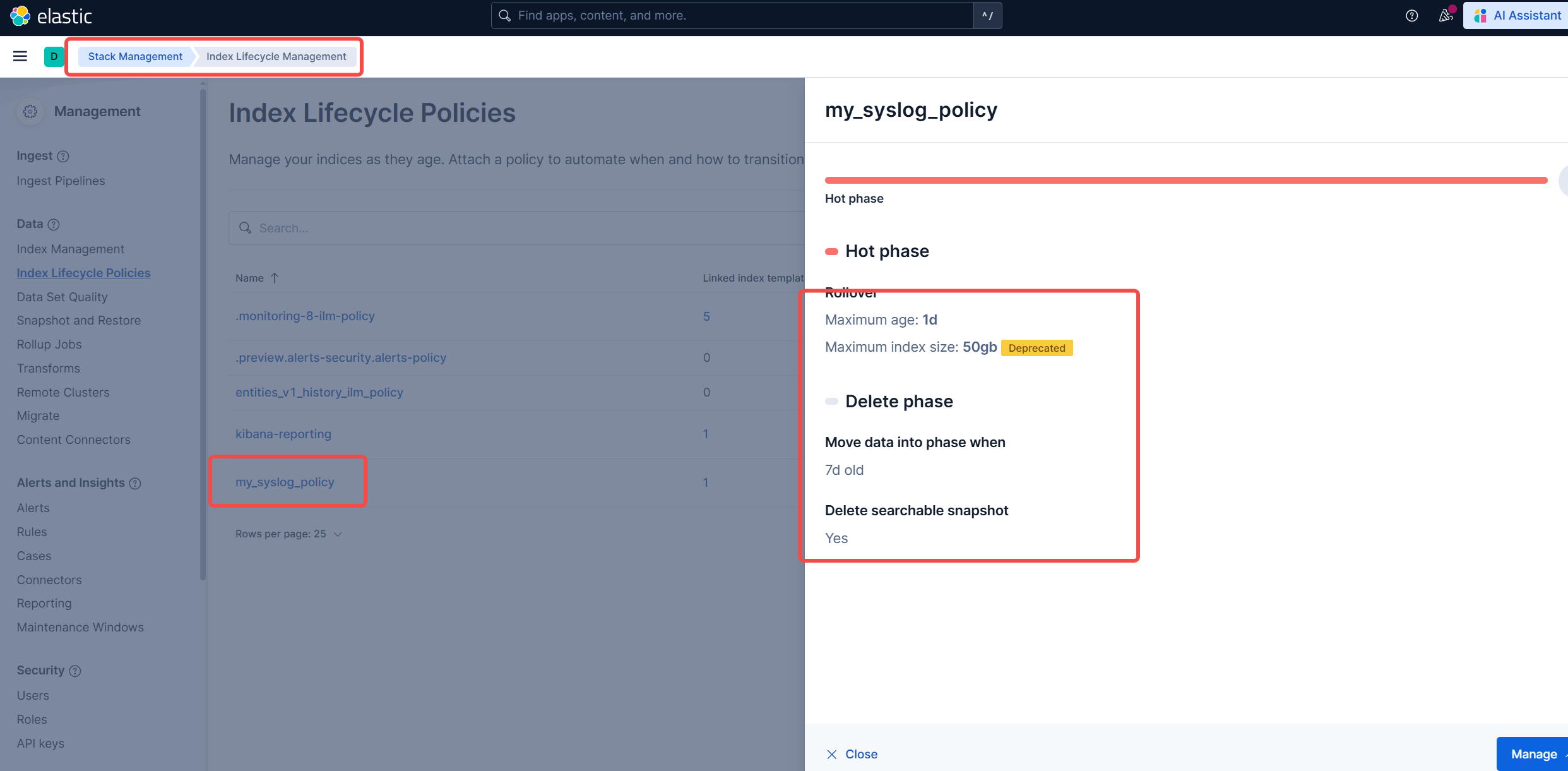
第二天创建了一个索引,syslog-security-*,索引默认会永久保存
现在要让他在7天后自动删除以节省空间

这个在kibana的面板上点点点也可以设置,但是我们这里用api,这俩是同步的

创建生命周期策略

1
2
3
4
5
6
7
8
9
10
11
12
13
14
15
16
17
18
19
20
21
22
23
24
PUT _ilm/policy/my_syslog_policy
min_age: 7d 满7天执行删除
rollover: 如果索引满1天或者满 50GB,就自动切分出一个新索引

{
"policy": {
"phases": {
"hot": {
"actions": {
"rollover": {
"max_age": "1d",
"max_size": "50gb"
}
}
},
"delete": {
"min_age": "7d",
"actions": {
"delete": {}
}
}
}
}
}

绑定生命周期策略到现有索引模板

1
2
3
4
5
6
7
8
9
10
11
12
13
14
15
16
17
18
19
20
21
PUT _index_template/syslog_template
{
"index_patterns": ["syslog-security-*"],
"template": {
"settings": {
"index.lifecycle.name": "my_syslog_policy",
"index.lifecycle.rollover_alias": "syslog-security"
}
}
}
syslog_template 匹配的索引模板
index_patterns 索引模板的匹配规则
index.lifecycle.name 绑定刚才创建的策略
index.lifecycle.rollover_alias 用于自动滚动的别名

# 存量索引
# 给 23 号和 24 号的索引手动开启生命周期管理
PUT /syslog-security-2026.03.2*/_settings
{
"index.lifecycle.name": "my_syslog_policy"
}
  1. 匹配范围:当一个新索引(如 syslog-security-2026.03.24)创建时,ES 会扫描所有模板。
  2. 冲突检查:如果有多个模板的 index_patterns 都匹配这个名字,ES 会检查 priority
  3. 报错触发:如果优先级相同,ES 为了防止配置混乱(比如模板 A 说要 3 个分片,模板 B 说要 1 个分片),就会抛出你看到的这个 illegal_argument_exception

CATALOG
  1. 1. 查看集群状态_cluster/health
  2. 2. 查看索引清单_cat/indices
  3. 3. ES的CRUD